


Record, and it's already text.
AI drafts the minutes.
Transcription runs entirely on your device. Writing, recording, and AI editing sit on one page — a notepad for iPhone, iPad, and Mac. Every AI change waits for your approval before it sticks.
● When you see this color, that's AI. The same note syncs across Mac and iPhone.
What it does.
Transcribes on the spot
Your words flow onto the page as you record. It all runs on the device — even with no signal.
The other side too (Mac)
Speaker audio from Zoom or Meet flows straight into the transcript. One record button captures the whole call.
Translates as it listens
Follow a meeting in another language — the transcript appears in yours, live. On the device, free, offline too.
Minutes from a recording
AI organizes decisions, to-dos (owner and due date), and open questions. Live minutes grow as you record.
AI edits, you approve
Every AI change is highlighted in indigo and doesn't stick until you approve it. Discard, and your note is untouched.
Markdown editor
A live preview that formats as you type. Attach an image and even the text inside it becomes searchable (OCR).
Search by meaning
Find "that thing" even when the words don't match. Semantic search that also runs on-device.
Sketch by hand
Draw full-screen with a finger or pencil — the sketch lives inside the note, and legible handwriting shows up in search.
Photos from your iPhone (Mac)
Right-click in a note to take a photo or scan a document with your iPhone — it lands right where you clicked.
Ask across your notes
The assistant answers from all your notes — find, summarize, and write things out. Appending is approval-based too.
Live Assist
When a question comes up in a meeting, an answer draft appears beside your note — grounded in what you've written.
On your wrist
Record quick memos on your Apple Watch — transcribed on your iPhone. Start or stop iPhone recording from your wrist.
Clip from your browser
Select text in Chrome, right-click, "Add to Nib" — saved instantly, with a link back to the source page. Chrome Web Store →
Works with your AI tools
Claude can search and add your notes (local MCP), and Nib's assistant can use your Zapier and Composio tools.
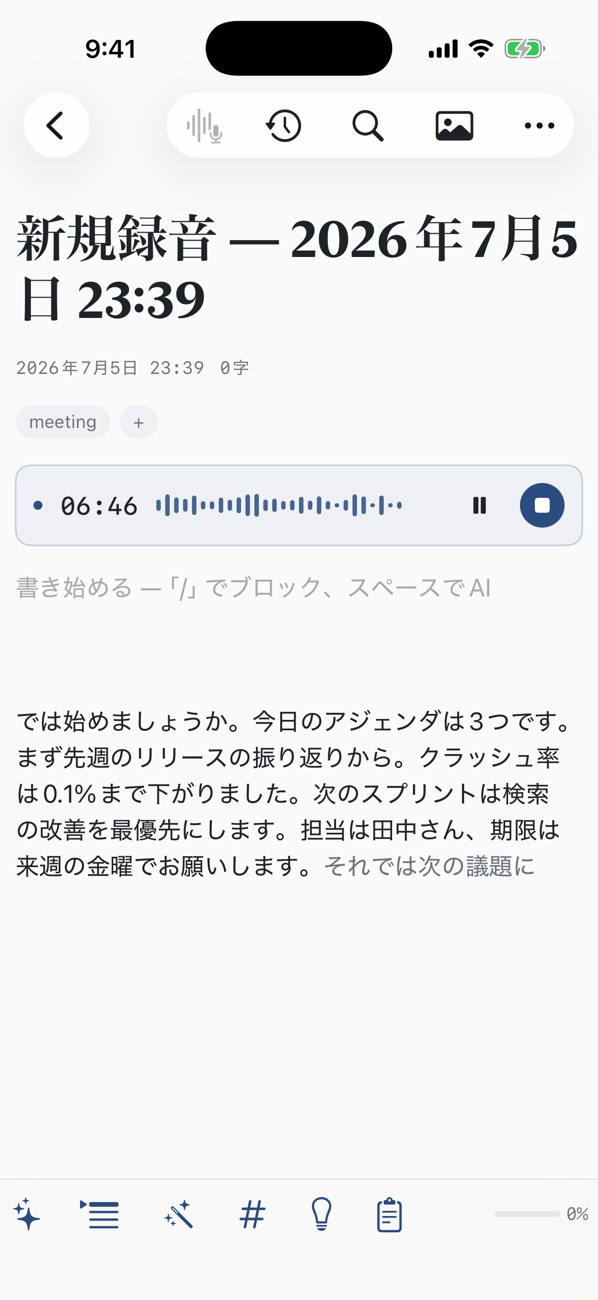
Recorded live on a Mac — the transcript appears as the meeting happens. Same note on iPhone, synced over iCloud.
Ask across every note.
Ask "what did we decide last week?" and the assistant searches across your notes, reads them, and answers. It can write new notes and revise existing ones too — always with your approval. Connect an MCP server and it reaches beyond your notes, into tools like Notion and Linear.
Your notes stay on the device.
- ✓Transcription, search, and summaries run on-device — they work offline
- ✓Only when you use cloud AI are the needed excerpts sent — never stored
- ✓Recorded audio stays on this device. It's never uploaded anywhere
- ✓No account required
Free to start. Everything, tried.
Free
- Writing, recording, on-device transcription
- On-device AI (summarize, clean up, tag)
- Free AI credits, refreshed monthly
- iCloud sync & share links
Pro
- Assistant across all your notes
- Minutes generated from recordings
- AI co-writing & advice
- Unlimited recording length
Common questions.
Does it work offline?
Yes. Recording, transcription, search, and on-device AI all run on the device, so they work with no signal. It only connects when you use cloud AI, such as generating minutes or asking the assistant.
Which languages are supported?
The app and AI support seven languages: English, Japanese, Simplified Chinese, Korean, Spanish, French, and German. Transcription works in every language your device's on-device speech recognition supports.
Can it translate what's being said?
Yes — Nib translates the transcript live as you record, and can translate any existing transcript too. Translation runs entirely on the device: it's free, and works offline once the language pack is downloaded.
Can it transcribe the other side of a call?
On Mac, the speaker audio from Zoom, Meet, and the like flows straight into the transcript. On iPhone and iPad, Nib transcribes the microphone.
Where are my notes and recordings stored?
Notes are stored on your device and in your iCloud. Recorded audio and images never leave the device. When you use cloud AI, only the needed excerpts are sent, and they're not stored.
What's the difference between Pro and credits?
Pro is a monthly or yearly plan with unlimited cloud AI and unlimited recording. Credit packs are a one-time purchase that let you use cloud AI by the amount you consume, without a subscription. Free AI credits refresh every month, so there's always some to try with.
Do I need to create an account?
No. Download and start writing. Sync uses your Apple iCloud, so there's no new account to create.
How much can I use for free?
Notes, sync, search, and on-device transcription are free with no note limit; each recording session runs up to 30 minutes. Cloud AI comes with free credits that refresh every month — for more, buy credit packs as you go, or go unlimited with Pro.
Can I get my notes out?
Notes are plain Markdown — copy them out anytime, print to PDF, or publish a note as a read-only web page and share the link. Nothing is locked in.
Is there an Apple Watch app?
Yes — record quick memos on your wrist and they become transcribed notes on your iPhone, or start, pause, and stop an iPhone recording from your watch.
Do you have a referral program?
Yes — share your invite code, and when a friend starts with it, you both get bonus AI credit (Settings → Invite).